I Deobfuscated a Scam: How bunnyband.com Fingerprints and Tracks Its Users
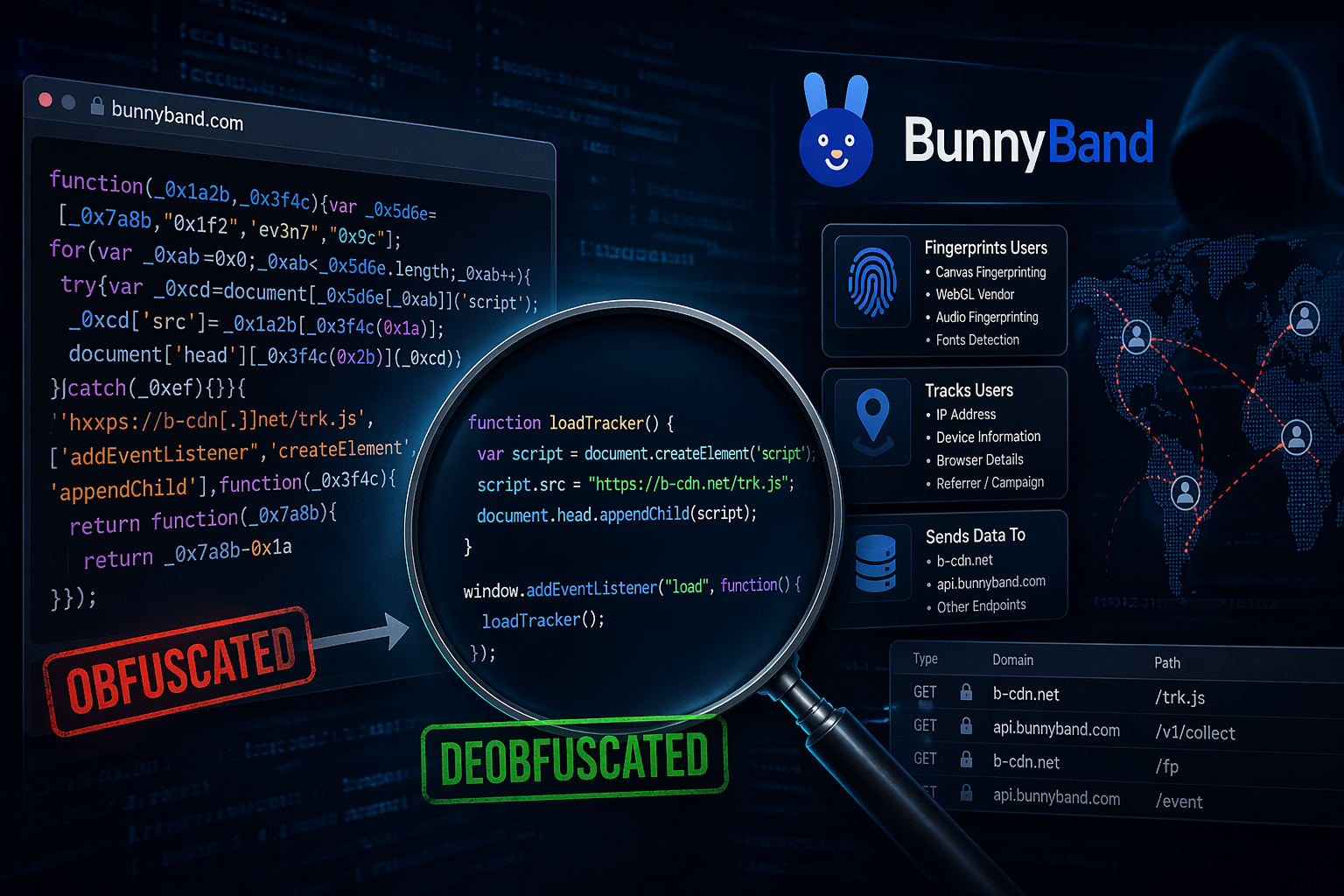
A friend asked me to check whether a website was legitimate. On the surface, bunnyband.com looks like a simple reward platform (complete a few tasks, watch some videos, reach $100, and cash out). What I found underneath was a geofenced fingerprinting operation collecting 34 data points from every visitor, a hidden form submitting in the background without any user interaction, and infrastructure already flagged by multiple DNS threat feeds. None of that is visible to the average user. This article walks through how I found it.
I will be using the JS Deobfuscation techniques learned in the previous article Recognizing JavaScript Obfuscation: A Deobfuscation Primer, so if you are not yet familiar with JavaScript Deobfuscation, you can visit the page to have a grasp of the techniques used in this article.
With that said let's move to the steps taken.
OSINT
After performing OSINT on the profile pictures in the testimonial section, the Medium and X account of some individuals featured in the testimonials were found and it turned out their real names differed from those displayed on the website.

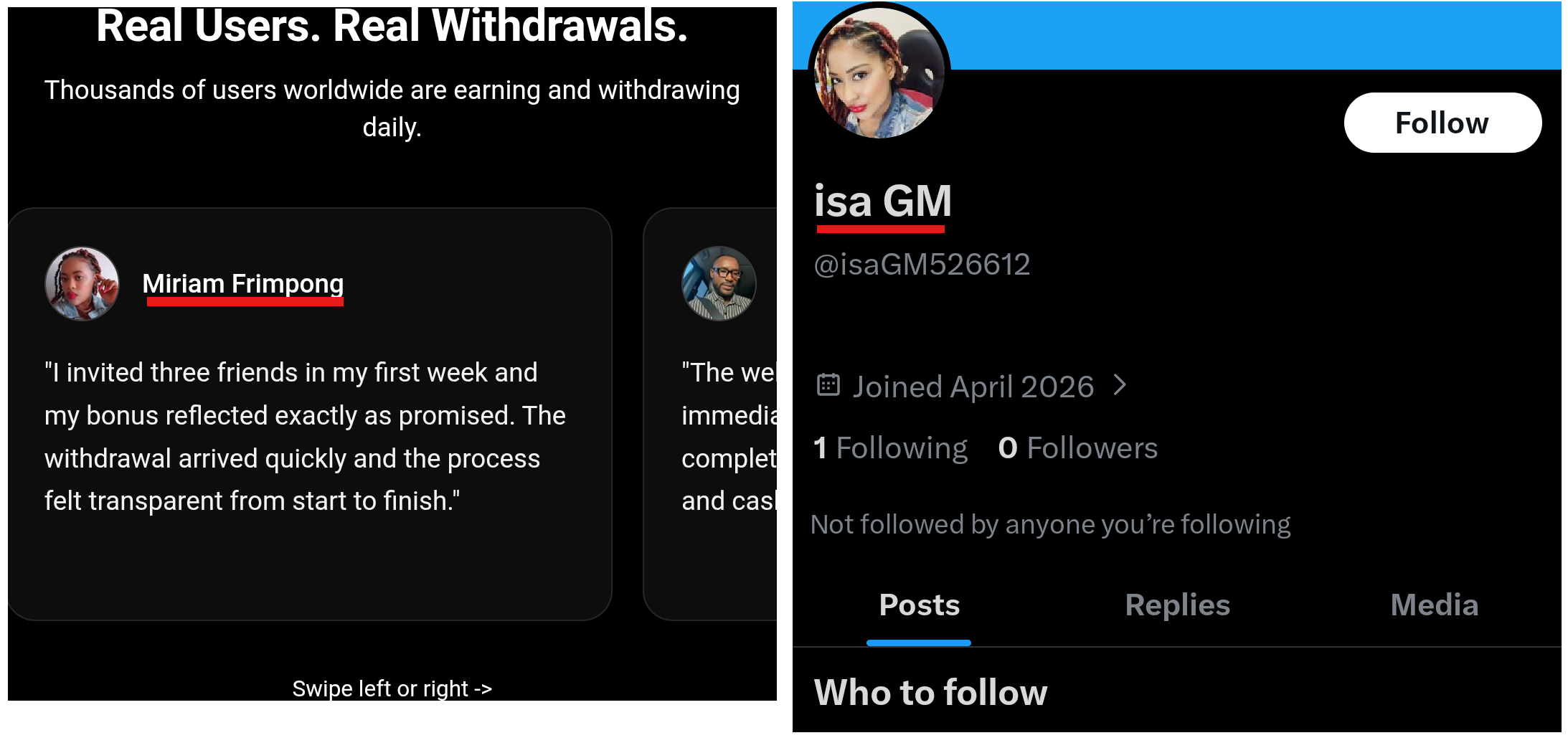
This alone was suspicious but I wanted to go further and understand the technical mechanism. I decided to analyze the links to the tasks found on the dashboard of each user.
Network analysis
After logging in and navigating to the task page, I noticed periodic fetch requests, visible in the Network tab of firefox's developer tool.
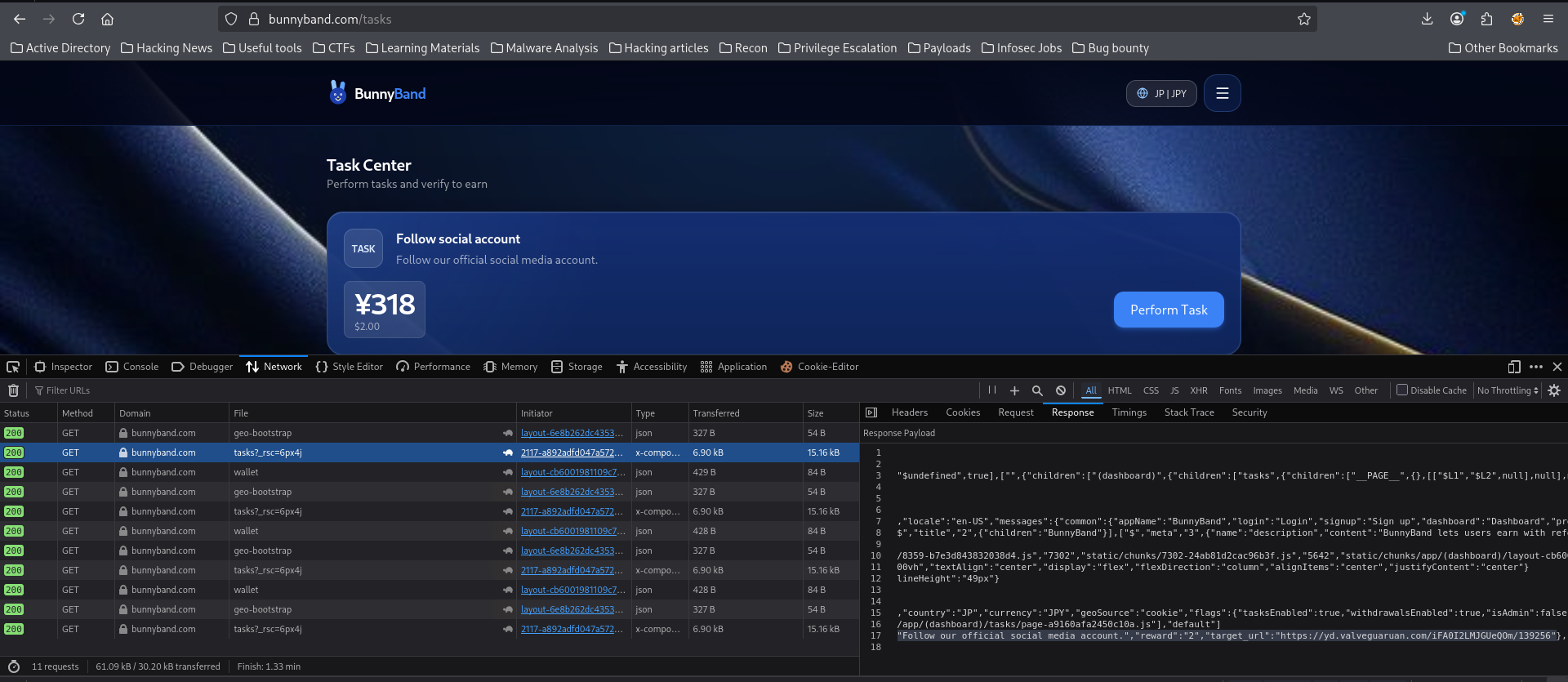
This request contained the links to the different tasks. Of the 6 tasks present on the dashboard, there were only 2 distinct URLs, which did not reflect the nature of the tasks at all. For a "watch a video" task, one would expect a YouTube link or similar. But none of these 2 links represented the tasks someone will be clicking for. After some cleanup, these are the different tasks, their descriptions and the links they lead to.

I then proceeded to analyze these 2 URLs.
Script 1 - valveguaruan.com
Get raw source code
Using curl I retrieved the raw source of this first URL.
┌──(jovi㉿Jovi)-[~]
└─$ curl https://yd.valveguaruan.com/iFA0I2LMJGUeQOm/139256
<!doctype html>
<html>
<head>
<meta name="viewport" content="width=device-width, initial-scale=1.0" />
<meta charset="utf-8" />
<style>* { border: 0; margin: 0; outline: 0; padding: 0}</style>
<title></title>
</head>
<body>
<script type="text/javascript">((()=>{var W={0x25be:(g,A,C)=>{var U=C(0x266),P=C(0x18ba),u=TypeError;g['exports']=function(p){if(U(p))return p;throw u(P(p)+'\x20is\x20not\x20a\x20function');};},0x17bd:(g,A,C)=>{var U=C(0x266),P=String,u=TypeError;g['exports']=function(p){if('object'==typeof p||U(p))return p;throw u('Can\x27t\x20set\x20'+P(p)+'\x20as\x20a\x20prototype');};},0x4c7:(g,A,C)=>{var U=C(0x13f8),P=C(0x1e),p=C(0xbfe)['f'],v=U('unscopables'),E=Array['prototype'];null==E[v]&&p(E,v,{'configurable':!0x0,'value':P(null)}),g['exports']=function(O){E[v][O]=!0x0;};},0x5fa:(g,A,C)=>{'use strict';var U=C(0x2206)['charAt'];g['exports']=function(P,u,p){return u+(p?U(P,u)['length']:0x1);};},0x169b:(g,A,C)=>{var U=C(0x1f28),P=TypeError;g
<SNIP>
Beautify the script
I proceeded to save the script in a file for further analysis. The first thing I noticed was that the script was minified into a single line.

I then beautified it using the command line tool jsbeautifier.
┌──(jovi㉿Jovi)-[~]
└─$ pip install jsbeautifier --break-system-package
Defaulting to user installation because normal site-packages is not writeable
Requirement already satisfied: jsbeautifier in ./.local/lib/python3.13/site-packages (1.15.4)
Requirement already satisfied: six>=1.13.0 in /usr/lib/python3/dist-packages (from jsbeautifier) (1.17.0)
Requirement already satisfied: editorconfig>=0.12.2 in ./.local/lib/python3.13/site-packages (from jsbeautifier) (0.17.1)

┌──(jovi㉿Jovi)-[~]
└─$ js-beautify script1.js > script1_clean.js
After this operation, the single-line script expanded to 3,249 lines. You can download the script here in case the link is not more accessible by the time you read this, for you to analyze alongside.
Identify the structure
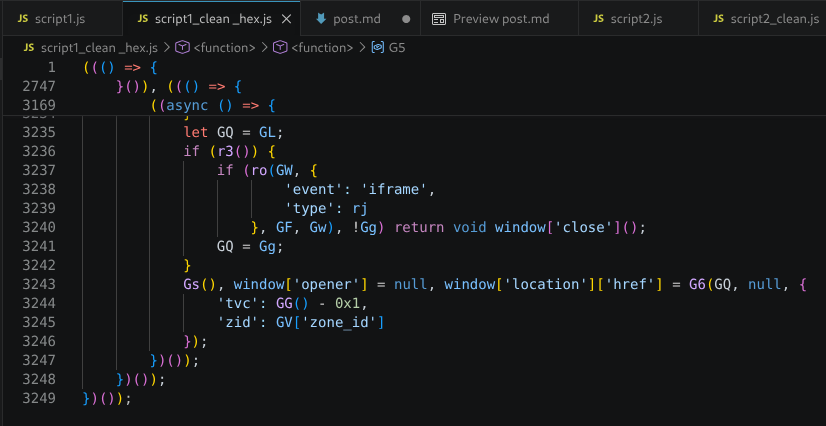
After looking at the top and bottom of the file, the script reveals its structure immediately:
// TOP: The module dictionary (webpack pattern)
var G = {
    0x25be: (B, W, L) => { ... },
    0x17bd: (B, W, L) => { ... },
    0x4c7: (B, W, L) => { ... },
    // ... ~200 more modules
};

// MIDDLE: The loader and cache
var s = {};
function V(B) {
    var W = s[B];
    if (void 0 !== W) return W.exports;
    var L = s[B] = { exports: {} };
    return G[B](L, L.exports, V), L.exports;
}

// BOTTOM: The main application (IIFE)
(() => {
    "use strict";
    let r0 = 0xe11;
    // <- a constant (3601)
    const r1 = () => r0;
    const r2 = (GV, GB) => { ... }; // <- the decoder function
    // ... the actual logic
})();
Decode the Hex strings
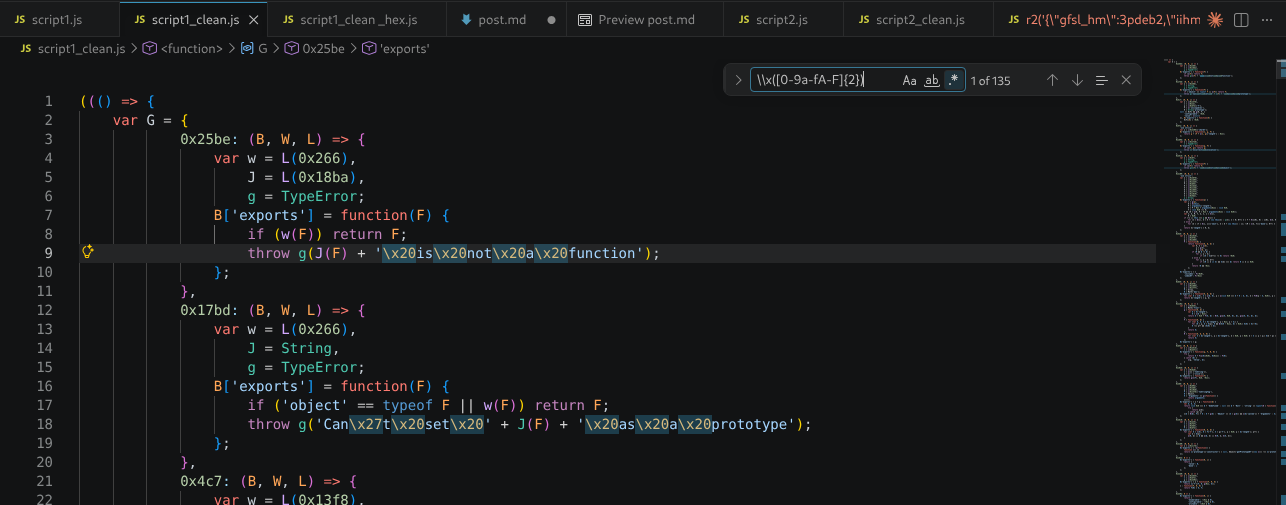
Before understanding the logic, I went to decode all the encoded strings.
I used the search bar of VsCode \\x([0-9a-fA-F]{2})
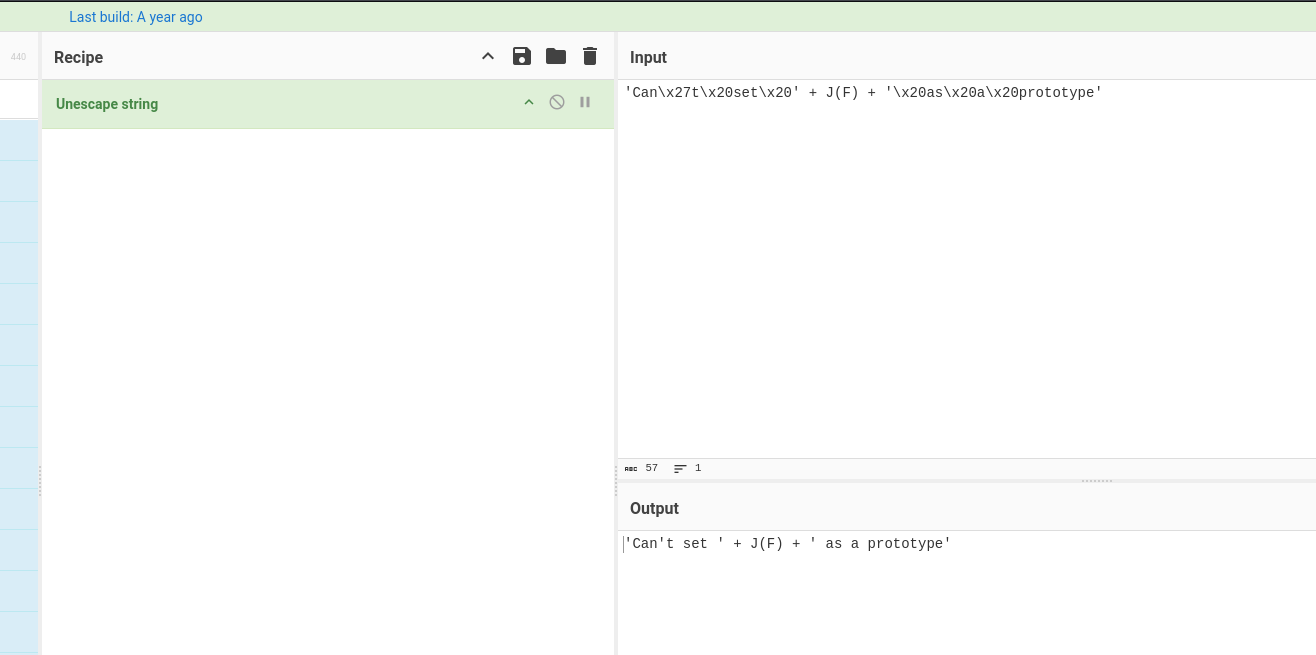
I then used CyberChef to decode each occurrence of hex strings using the recipe Unescape string which automatically decodes all \x and \u sequences
Find the obfuscated config
After examining the script (which was not immediately clear), I found an encrypted JSON config at line 3170 being passed to the r2 function. Things became clearer. Even though the function name was mangled, it was evident from the structure that r2 was a decoder function.
// The call to r2
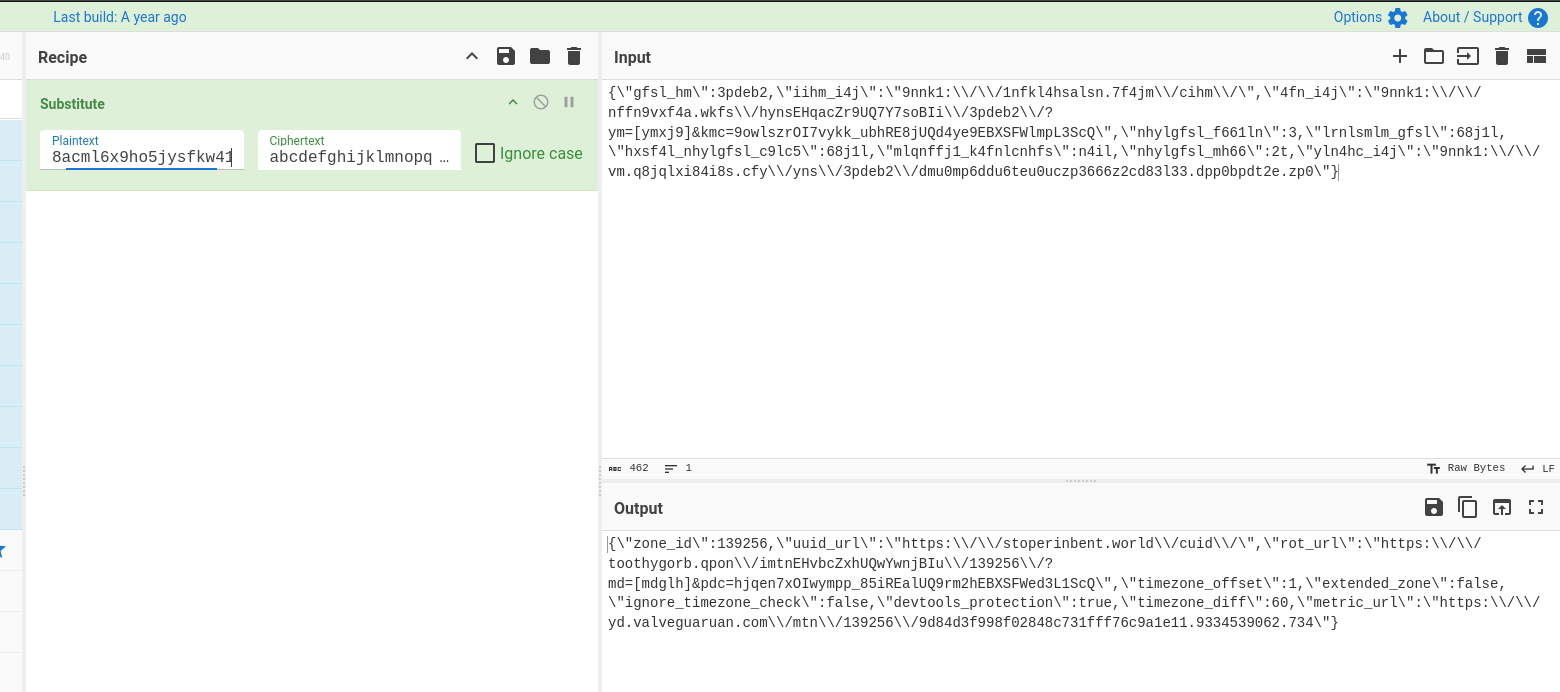
const GV = r2('{\"gfsl_hm\":3pdeb2,\"iihm_i4j\":\"9nnk1:\\/\\/1nfkl4hsalsn.7f4jm\\/cihm\\/\",\"4fn_i4j\":\"9nnk1:\\/\\/nffn9vxf4a.wkfs\\/hynsEHqacZr9UQ7Y7soBIi\\/3pdeb2\\/?ym=[ymxj9]&kmc=9owlszrOI7vykk_ubhRE8jUQd4ye9EBXSFWlmpL3ScQ\",\"nhylgfsl_f661ln\":3,\"lrnlsmlm_gfsl\":68j1l,\"hxsf4l_nhylgfsl_c9lc5\":68j1l,\"mlqnffj1_k4fnlcnhfs\":n4il,\"nhylgfsl_mh66\":2t,\"yln4hc_i4j\":\"9nnk1:\\/\\/vm.q8jqlxi84i8s.cfy\\/yns\\/3pdeb2\\/dmu0mp6ddu6teu0uczp3666z2cd83l33.dpp0bpdt2e.zp0\"}', 'abcdefghijklmnopqrstuvwxyz01234567898acml6x9ho5jysfkw41niq7rvgt3ep0b2zud'),

// The r2() function at line 2751
r2 = (GV, GB) => {
    const GW = GB['length'] / 0x2,
        GL = GB['substr'](0x0, GW),
        Gw = GB['substr'](GW);
    return JSON['parse'](GV['split']('')['map'](GJ => {
        const Gg = Gw['indexOf'](GJ);
        return -0x1 !== Gg ? GL[Gg] : GJ;
    })['join'](''));
}
After analyzing the function, I realized that the first argument is the ciphertext (GV) and the second is the key(GB). The key is split in half (the first half serves as the plaintext alphabet, and second half as the cipher alphabet) with characters mapped between them. This is a straightforward character substitution cipher. I then copied the encrypted config to cyberchef for decryption using the substitute recipe
I then saved the decoded configs and made some manipulations on it for it to be more clear using the command
cat config.js | tr -d '\' | jq
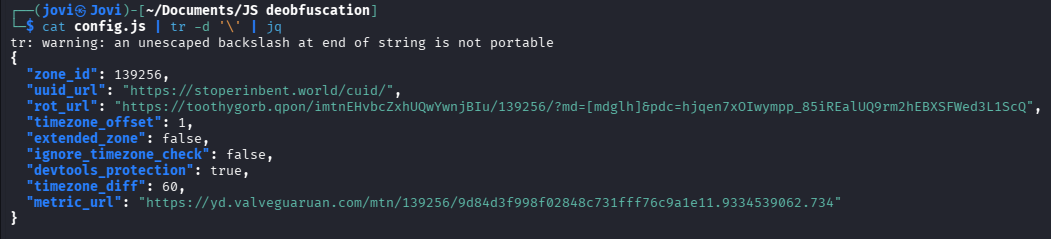
I now have 3 new endpoints, but I don't yet know what is sent to those URLs, but after some quick research, this is most likely a thirdparty endpoint. Nevertheless, since I had the variables where each of this configs are stored, I proceeded and made a search for each of the variables containing the different URLs to understand what really happens
// From line 3170
const GV = r2('<CIPHERTEXT>', '<KEY>'),
    {
        trace: GB,
        metric_url: GW,
        [G7]: GL,
        uuid_url: Gw,
        reverse_url: GJ,
        iframe_url: Gg,
        metrics: GF = !0x1
    } = GV,
Trace each URL's role
To confirm what each decoded URL does, I just read the code that uses it
uuid_url
After searching for GW after the line 3170, I found a call to a function rY() that passes that GW as argument

I then searched for the rY() function definition to understand what happens
// On line 2984
rY = GV => {
    const GB = ((() => {
        const GW = rc['getItem'](rP);
        return 'string' == typeof GW && GW['length'] > 0x0 ? (G4(GW), GW) : '';
    })());
    return window[rD] ? window[rD] : GV ? GB ? (window[rD] = Promise['resolve'](GB), Promise['race']([rH(GV, GB)['catch'](() => GB), rb(0x7530)['then'](() => GB)])['then'](GW => {
        window[rD] = Promise['resolve'](GW);
    }), window[rD]) : (window[rD] = Promise['race']([rH(GV, GB)['catch'](() => GB), rb(0x7530)['then'](() => GB)]), window[rD]) : (window[rD] = Promise['resolve'](GB), window[rD]);
},
rY() checks local storage first, then calls rH() to fetch from uuid_url:
// on line 2974
rH = (GV, GB) => rz(GV + '?f=' + encodeURIComponent(window['location']['href']['slice'](0x0, window['location']['href']['indexOf']('/', 0x8))), {
    'key': GB
}, {
    'credentials': 'include'
})['then'](GW => GW['json']())['then'](GW => {
    let {
        key: GL
    } = GW;
    return G4(GL), rc['setItem'](rP, GL), GL;
}),
On line 3102, I have this code snippet
G4 = GV => {
    G0 = GV;
},
So if I'm to rewrite what happens here this is the code that is executed clearly
rH = (url, existingKey) => fetch(
    url + "?f=" + encodeURIComponent(currentDomain),
    { body: { key: existingKey }, credentials: "include" }
)
.then(r => r.json())
.then(data => {
    localStorage.setItem("bf001a61-...", data.key); // persists across sessions
    G0 = data.key;
    // available in memory
    return data.key;
})
Conclusion: uuid_url is an identity assignment endpoint. It assigns a UUID per visitor, refreshes it on return visits, and that UUID flows into G0 which is included as "u" in all outbound data.
metric_url
The call to this url appears 3 times in the code, and all of them are errors/detection conditions:
// line 3221 : timezone fail
return GN['debug']('time zone check failed'), GW && ro(GW, {
    'event': 'time zone err',
    'type': rj
}, GF, Gw), void window['close']();

// line 3230 : history fail
GN['debug']('can not apply reverse'), GW && ro(GW, {
    'event': 'reverse err',
    'type': rj
}, GF, Gw);

// line 3237 : iframe detected
if (ro(GW, {
    'event': 'iframe',
    'type': rj
}, GF, Gw), !Gg) return void window['close']();
Basically this url is just to collect logs to tell the operator what happened.
rot_url
The challenge here was identifying which variable held the rot_url value in the code, but VS Code's Go to Definition feature (
metric_url: GW,
[G7]: GL,
uuid_url: Gw,
reverse_url: GJ,
iframe_url: Gg,
metrics: GF = !0x1
G7 was defined in line 3163 as G7 = 'rot_url',. So to look for the function calling it, I just had to search for GL
Searching for GL led to this code snippet at line 3235
let GQ = GL;
if (r3()) {
    if (ro(GW, {
            'event': 'iframe',
            'type': rj
        }, GF, Gw), !Gg) return void window['close']();
    GQ = Gg;
}
Gs(), window['opener'] = null, window['location']['href'] = G6(GQ, null, {
    'tvc': GG() - 0x1,
    'zid': GV['zone_id']
});
Looking for G6 function definition led to this
G6 = (GV, GB, GW, GL) => {
    const Gw = G5(GW, GL),
        GJ = GB || /\[mdglh]/g;
    return Gw ? null == GV ? void 0x0 : GV['replace'](GJ, Gw) : GV;
},
While keeping in mind GV represents the rot_url, I went further to see what G5 does and found something strange
G5 = function() {
    let GV = arguments['length'] > 0x0 && void 0x0 !== arguments[0x0] ? arguments[0x0] : {},
        GB = arguments['length'] > 0x1 ? arguments[0x1] : void 0x0;
    try {
        var GW, GL, Gw, GJ, Gg, GF;
        const GN = null !== (GW = navigator['connection']) && void 0x0 !== GW ? GW : {},
            [, GE] = rg(),
            GQ = {
                ...rT(GV, ['zid']),
                's': window['screen']['width'] + 'x' + window['screen']['height'],
                'b': rR() + 'x' + rk(),
                'r': document['referrer']['substring'](0x0, 0xff),
                'q': window['location']['href']['substring'](0x0, 0xff),
                'h': rO(),
                't': new Date()['getTimezoneOffset'](),
                'z': G3,
                'k': G1,
                'u': G0,
                'f': r3(),
                'wh': ru(),
                'ih': rA(),
                'e': GE['slice'](0x0, 0xf)['join'](''),
                'o': void 0x0 === window['orientation'],
                'm': ry(),
                'w': encodeURIComponent(JSON['stringify'](rE())),
                'ts': navigator['maxTouchPoints'],
                'pr': null !== (GL = window['devicePixelRatio']) && void 0x0 !== GL ? GL : 0x1,
                'dm': navigator['deviceMemory'],
                'hc': navigator['hardwareConcurrency'],
                'bl': 'number' != typeof rm() ? 'wrong format' : rm(),
                'bc': ri(),
                'vv': G2['vendor'],
                'vr': G2['renderer'],
                'ac': re(),
                'ct': null !== (Gw = GN['type']) && void 0x0 !== Gw ? Gw : 'unknown',
                'cet': null !== (GJ = GN['effectiveType']) && void 0x0 !== GJ ? GJ : 'unknown',
                'cdlm': GN['downlinkMax'] && isFinite(GN['downlinkMax']) ? GN['downlinkMax'] : -0x1,
                'cdl': null !== (Gg = GN['downlink']) && void 0x0 !== Gg ? Gg : -0x1,
                'crtt': null !== (GF = GN['rtt']) && void 0x0 !== GF ? GF : -0x1,
                'tms': r1(),
                'ce': navigator['cookieEnabled'],
                'cd': screen['colorDepth'],
                'or': screen['orientation']['type'],
                'dt': window['matchMedia']('(prefers-color-scheme: dark)')['matches']
            };
        let GU = JSON['stringify'](GQ);
        return GU = window['btoa'](GU), GU = GU['replace'](/=/g, ''), GU = encodeURIComponent(GU), GU;
    } catch (Ga) {
        return null == GB || GB(rI, {
            'error': Ga
        }), '';
    }
},
So to break things down, this is what happens:
- G5() builds the 25+ field fingerprint and returns it base64-encoded.
- G6() takes that output and replaces the [mdglh] placeholder in rot_url.
- The user is then redirected to the resulting URL.
What intrigues me now is why are all these informations taken? After additional researches on this script, this is exactly what is sent to rot_url.
What follows is not a short list; this is 34 data points collected from a single click on what the user was told was a video task.
| Field / Variable | Source | What It Represents |
|---|---|---|
| s | window.screen.width + 'x' + window.screen.height | Screen resolution (e.g. "1920x1080") |
| b | rR() + 'x' + rk() | Browser viewport width x height (visible area, excludes toolbars) |
| r | document.referrer | URL of the page that linked to this page (max 255 chars) |
| q | window.location.href | Current full URL of the page (max 255 chars) |
| h | rO() | Random number between 1 and 10000 — session entropy/nonce |
| t | new Date().getTimezoneOffset() | Timezone offset from UTC in minutes (e.g. -60 for UTC+1) |
| z | G3 | Random session identifier generated once on script load |
| k | G1 | Ad blocker status (1 = detected, 4 = not detected, 2 = error) |
| u | G0 | Persistent tracking UUID stored in localStorage |
| f | r3() | iframe detection — true if page is running inside an iframe |
| wh | ru() | Inner window size if in iframe, otherwise "not in iframe" |
| ih | rA() | Outer window dimensions (window.outerWidth x window.outerHeight) |
| e | GE.slice(0, 15).join('') | 15-character entropy string from shuffled alphanumeric alphabet |
| o | void 0 === window.orientation | Desktop detection — true if orientation API is absent |
| m | ry() | Timestamp from Date.now() with spoofing detection |
| w | encodeURIComponent(JSON.stringify(rE())) | Page metadata: title, meta keywords, top 3 words |
| ts | navigator.maxTouchPoints | Maximum number of touch points (touch device detection) |
| pr | window.devicePixelRatio | Display pixel density ratio (HiDPI/Retina detection) |
| dm | navigator.deviceMemory | Device RAM in GB (rounded to nearest power of 2) |
| hc | navigator.hardwareConcurrency | Number of logical CPU cores |
| bl | rm() | Battery level (0–1) or "wrong format" |
| bc | ri() | Battery charging status (2 = charging, 1 = not charging, 3 = unavailable) |
| vv | G2.vendor | WebGL GPU vendor string |
| vr | G2.renderer | WebGL GPU renderer string |
| ac | re() | Bot detection bitmask (0 = human, non-zero = bot indicators) |
| ct | navigator.connection.type | Network connection type (wifi, cellular, ethernet) |
| cet | navigator.connection.effectiveType | Effective connection speed ("4g", "3g", etc.) |
| cdlm | navigator.connection.downlinkMax | Max downlink speed in Mbps (-1 if unavailable) |
| cdl | navigator.connection.downlink | Current downlink speed in Mbps (-1 if unavailable) |
| crtt | navigator.connection.rtt | Round-trip time estimate in ms (-1 if unavailable) |
| tms | r1() | Computed timezone delta for geofencing |
| ce | navigator.cookieEnabled | Whether cookies are enabled |
| cd | screen.colorDepth | Color depth (bits per pixel) |
| or | screen.orientation.type | Screen orientation (landscape, portrait, etc.) |
| dt | window.matchMedia('(prefers-color-scheme: dark)').matches | Dark mode preference |
We should also note that ...rT(GV, ['zid']) at the top spreads any additional properties from the config object GV excluding zid into the payload, so the server may receive additional fields beyond these 34 depending on what the config contains at runtime.
Additional Code Analysis
All this felt unreal; moving from simple tasks to fingerprint was insane. I could stop here but I decided to continue to reverse engineer the code and found some additional information.
History manipulation
I found a back button trap on line 3227
try {
    history['pushState'](null, document['title'], GJ), history['pushState'](null, document['title'], GJ);
} catch (GU) {
    GN['debug']('can not apply reverse'), GW && ro(GW, {
        'event': 'reverse err',
        'type': rj
    }, GF, Gw);
}
This is the equivalent code
try {
    history.pushState(null, document.title, reverseURL);
    history.pushState(null, document.title, reverseURL);
} catch(e) {
    <SNIP>
}
This was an unexpected use of the History API that I had not previously encountered in the wild.
The timezone gate
On line 3201, there is this code snippet that closes the window if the user is not in a specific UTC zone
if (GN['debug']('init', GV), !(GU => {
        const {
            extended_zone: Ga,
            timezone_diff: GK,
            timezone_offset: GS,
            ignore_timezone_check: Gp
        } = GU;
        if (void 0x0 !== GS) {
            const Ge = -0x1 * new Date()['getTimezoneOffset']();
            r0 = Math['abs'](Ge - 0x3c * GS), 0x0 === r0 && (r0 = 0x1);
        } else r0 = 0xe12;
        if (Gp) return !0x0;
        if (void 0x0 !== GS) {
            const Gd = -0x1 * new Date()['getTimezoneOffset'](),
                Gq = Math['abs'](Gd - 0x3c * GS);
            return !(0x0 !== Gq && 0x1e !== Gq && 0x3c !== Gq && 0x5a !== Gq && 0x78 !== Gq || Gq > GK && ((Gv => {
                Gv['capping'] = 0x15180, Gv['frequency'] = 0x1, Gv['every_view'] = !0x1, Gv['every_page'] = !0x1, Gv['every_session'] = !0x1;
            })(GU), Ga));
        }
        return !0x1;
    })(GV)) return GN['debug']('time zone check failed'), GW && ro(GW, {
    'event': 'time zone err',
    'type': rj
}, GF, Gw), void window['close']();
Trying to simplify the code to ease comprehension, I got this
if (!(GU => {
    const {
        extended_zone: Ga,
        timezone_diff:  GK,    // ← 60 from config
        timezone_offset: GS,   // ← 1 from config
        ignore_timezone_check: Gp
    } = GU;

    if (void 0x0 !== GS) {
        const Ge = -0x1 * new Date()['getTimezoneOffset']();
        // Ge = visitor's actual UTC offset in minutes
        // GS * 60 = expected UTC offset in minutes (1 * 60 = 60 = UTC+1)

        r0 = Math['abs'](Ge - 0x3c * GS);
        // 0x3c = 60
        // r0 = absolute difference between visitor timezone and target timezone
        0x0 === r0 && (r0 = 0x1);
    } else r0 = 0xe12;

    if (Gp) return !0x0;  // ignore_timezone_check = true → skip check entirely

    if (void 0x0 !== GS) {
        const Gd = -0x1 * new Date()['getTimezoneOffset']();
        const Gq = Math['abs'](Gd - 0x3c * GS);

        // Accepted offsets: 0, 30, 60, 90, 120 minutes difference
        return !(
            0x0  !== Gq &&   // exact match
            0x1e !== Gq &&   // 30 min off  (half-hour timezone)
            0x3c !== Gq &&   // 60 min off  (1 hour)
            0x5a !== Gq &&   // 90 min off
            0x78 !== Gq      // 120 min off
            ||
            Gq > GK          // difference exceeds timezone_diff (60)
        );
    }
    return !0x1;  // no timezone_offset in config → always fail
})(GV))

// ↓ This runs if the timezone check FAILED (the ! inverts the result)
return GN['debug']('time zone check failed'),
       GW && ro(GW, { 'event': 'time zone err', 'type': rj }, GF, Gw),
       void window['close']();
Breaking down the logic: If the difference is exactly 0, 30, 60, 90, or 120 minutes AND difference does not exceed timezone_diff (60), the script will be allowed to continue. Meaning the timezone difference must not exceed 60 minutes.
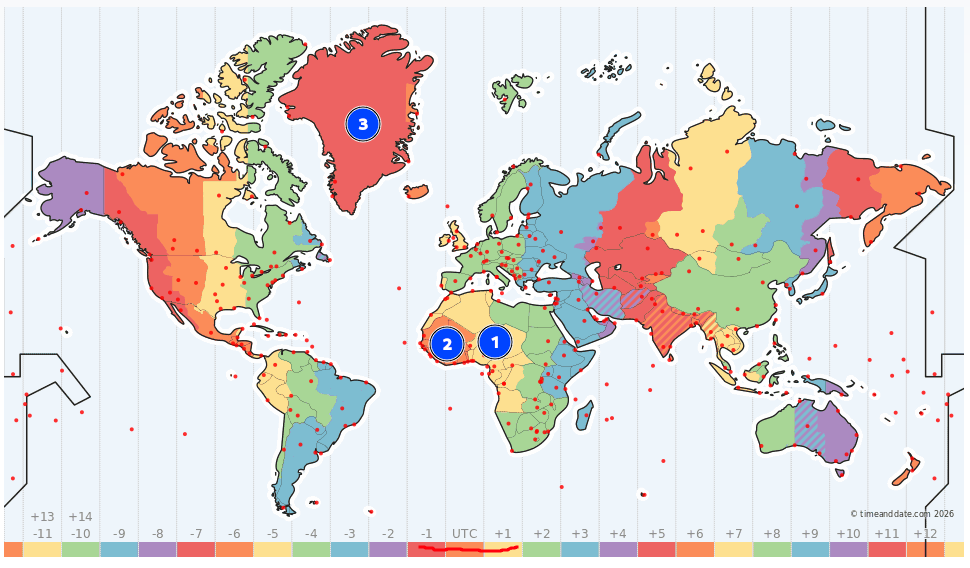
This is a geofencing mechanism, the script targets users in a specific geographic region (around UTC-1 to UTC+1; which covers most of West Africa, Central Africa and Western Europe). Anyone outside that region gets silently dropped with no fingerprint collected and no redirect.
Script 2 - crn77.com
Get Raw source code
Using curl, I downloaded the raw source of the second URL
curl https://crn77.com/4/10035016
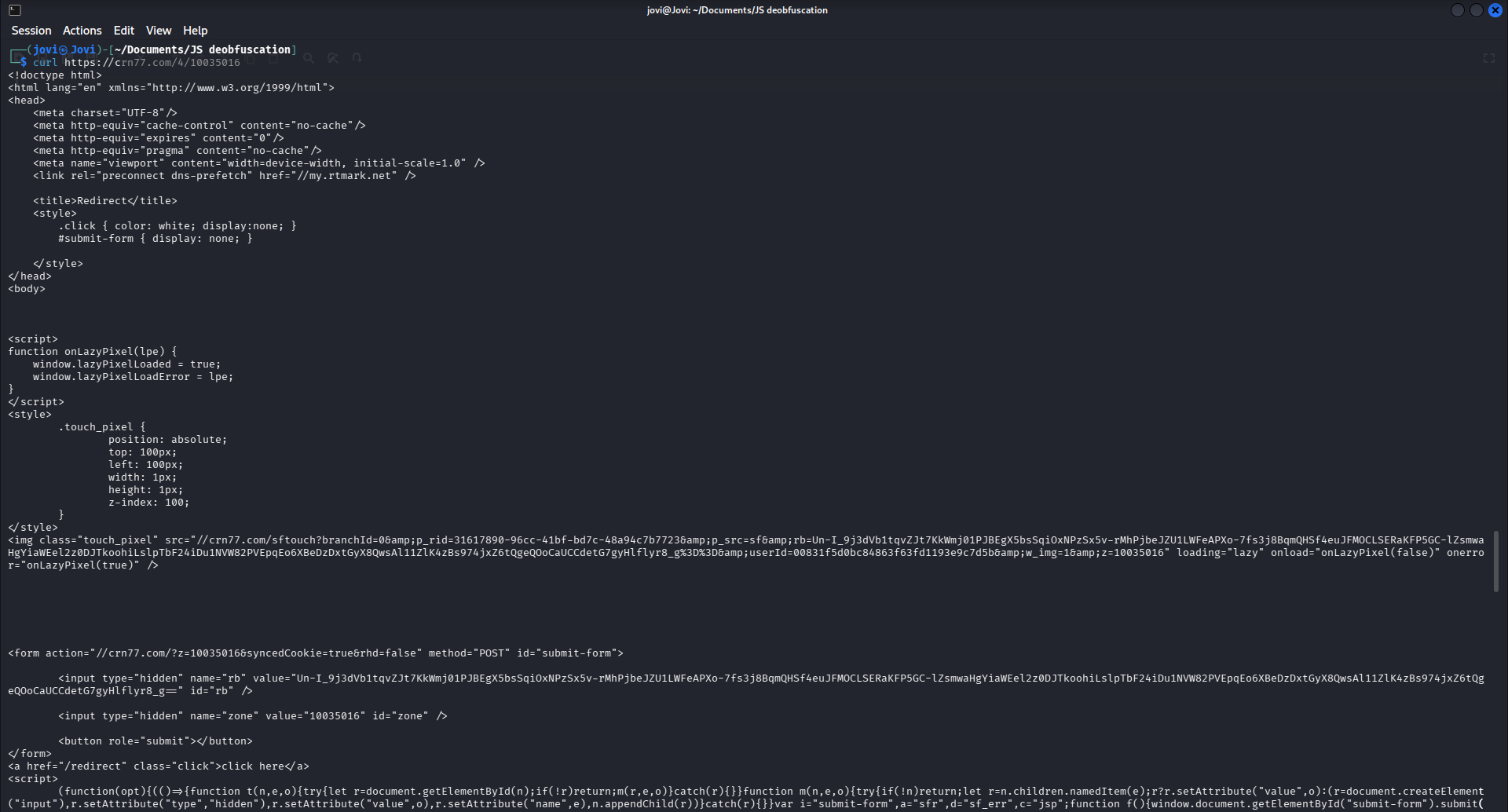
From the curl output I noticed the html contained a visible 1x1 tracking pixel.
<img class="touch_pixel" src="//crn77.com/sftouch?branchId=0&p_rid=31617890-96cc-41bf-bd7c-48a94c7b7723&p_src=sf&rb=Un-I_9j3dVb1tqvZJt7KkWmj01PJBEgX5bsSqiOxNPzSx5v-rMhPjbeJZU1LWFeAPXo-7fs3j8BqmQHSf4euJFMOCLSERaKFP5GC-lZsmwaHgYiaWEel2z0DJTkoohiLslpTbF24iDu1NVW82PVEpqEo6XBeDzDxtGyX8QwsAl11ZlK4zBs974jxZ6tQgeQOoCaUCCdetG7gyHlflyr8_g%3D%3D&userId=00831f5d0bc84863f63fd1193e9c7d5b&w_img=1&z=10035016" loading="lazy" onload="onLazyPixel(false)" onerror="onLazyPixel(true)" />
After some indentation this is what we have
<img class="touch_pixel"
    src="//crn77.com/sftouch
        ?branchId=0
        &p_rid=b9aadc97-2ade-497c-8159-c62d330f2a04
        &p_src=sf
        &rb=LnrOzvz0HP_MeWtwGOzIV9OXJ2...
        &userId=00831c2d1eb6452ee9618c8579b25879
        &w_img=1
        &z=10035016"
    style="position:absolute; top:100px; left:100px; width:1px; height:1px;"
    loading="lazy"
    onload="onLazyPixel(false)"
    onerror="onLazyPixel(true)" />
This fires on page load regardless of JS execution and sends userId to crn77.com tracking backend, with the rb parameter here being a signed session token
Beautify the Script
Nothing alarming surfaced here, so the script was saved in a file and the same steps taken to beautify it since it was also minified
┌──(jovi㉿Jovi)-[~]
└─$ js-beautify script2.js > script2_clean.js
Identify the Structure
This script handed the configs unencrypted at the bottom of the script
"zoneId": 10035016,
"rid": "ksX-wKK1z8yLZCaWKyzJyw==",
"isAab": false,
"globalIdPixelURL": "https://my.rtmark.net/img.gif?f=merge\u0026userId=00831d5bd4354234ed6b1b80e91cfaec\u0026z=10035016\u0026p_rid=f645b984-5434-4408-bc34-659d5435239e\u0026p_src=sf",
"globalIdGidJsURL": "https://my.rtmark.net/gid.js?userId=00831d5bd4354234ed6b1b80e91cfaec\u0026set2ud=true\u0026z=10035016\u0026p_rid=f645b984-5434-4408-bc34-659d5435239e\u0026p_src=sf",
"request_ab2": 0,
..<SNIP>..
"adexInjectEnabled": true,
"adexInjectClientId": "1db9169f-90f4-4b2d-b517-bc47aab19c1f",
"adexInjectCustomId1": "iclick-submit-form",
"adexInjectCustomId2": "",
"onlineFiltrationEnabled": true,
"userId": "00831d5bd4354234ed6b1b80e91cfaec",
"requestId": "f645b984-5434-4408-bc34-659d5435239e",
"adexQualitatorLogPath": "/qlog/add?userId=00831d5bd4354234ed6b1b80e91cfaec\u0026p_rid=f645b984-5434-4408-bc34-659d5435239e\u0026z=10035016",
"aliveTimeouts": null,
"aliveFull": false,
"aliveURL": "/alive?branchId=0\u0026p_rid=f645b984-5434-4408-bc34-659d5435239e\u0026p_src=sf\u0026rb=a-Rll1Ad9Gi5rt5eJetDOtIN5idnWzMquMzSbSdfxCVnHLzu_gYpnnvIa7Nm5YGbh6DvC-qAm-ThjVme28FFV7BLkR2tfkwP1-uJlmVMW2uOiLxtTeAYbomFF6woBz2UbJWC2tySeyROXzk4kp0zxUEzc7GwCh1XJphZrfmKeskKDUyUYMMOp2UodcZG3TvdVxX8nPqnnsA9pr8llHF2Uw%3D%3D\u0026userId=00831d5bd4354234ed6b1b80e91cfaec\u0026w_img=1\u0026z=10035016"
The key findings from this config are the userId (a persistent cross-site tracking ID), rtmark.net (a cross-site identity resolution network), adexInjectEnabled ( value true indicates ad injection active) and onlineFiltration (value true indicates bot filtering active)
After navigating through the script, I noticed the entire obfuscation relies on a string array (the long array at the top of the file) and string interleaving, with the decoding function found at line 984
n = function n(t) {
    return t[jv](Gd)[tp]((n, t, e) => e % Hd ? n + t : t + n, Gd)
},
By following the defined array at the top, this function translates to
var n = function n(t) {
    return t.split("").reduce(
        (n, t, e) => e % 2 ? n + t : t + n,
        ""
    );
};
With 500+ encoded strings, manual decoding in the console was impractical, so I wrote a Python script to batch-process all assignments. I copied the initial variables from line 61 and saved to a file script2_vars.js, then copied the assignment with the n() function from line 1116 to script2_assignment.js file and used the following python code to assign the real value of the variables interleaved.
The first file script2_vars.js contains the raw encoded string constants (e.g. Fu = "Verify"), while script2_assignments.js contains the variable assignments that use the n() decoder function (e.g. _n = n(Xh)).
import re
from functools import reduce

# Read both files
with open('script2_vars.js', 'r') as f:
    file1 = f.read()

with open('script2_assignments.js', 'r') as f:
    file2 = f.read()

# Extract all variable assignments from file 1
# Matches: varName = "stringValue"
pattern = r'\b([A-Za-z_$][A-Za-z0-9_$]*)\s*=\s*"([^"]*)"'
mappings = dict(re.findall(pattern, file1))

# Also catch single-char string assignments like: P = "t"
# (already covered by above pattern)

print(f"Found {len(mappings)} variable mappings")

def n_decode(s):
    return reduce(lambda acc, t: t[1] + acc if t[0] % 2 == 0 else acc + t[1],
                  enumerate(s), '')

# Apply both steps in one pass
def replace_n_calls_decoded(text, mappings):
    def replacer(match):
        var_name = match.group(1)
        if var_name in mappings:
            decoded = n_decode(mappings[var_name])
            return f'"{decoded}"'
        return match.group(0)

    return re.sub(r'\bn\(([A-Za-z_$][A-Za-z0-9_$]*)\)', replacer, text)


result = replace_n_calls_decoded(file2, mappings)

with open('script2_decoded.js', 'w') as f:
    f.write(result)

print("Done. Output: script2_decoded.js")
I then executed the code and copied the output from script2_decoded.js to the initial script
┌──(jovi㉿Jovi)-[~/Documents/JS deobfuscation]
└─$ python3 decode_vars.py
Found 865 variable mappings
Done. Output: script2_decoded.js
The Hidden Form
After decoding, I got lost in the too many variables present and the code was still not very clear. I then went back to the curl output and noticed in the HTML code there was a form I had overlooked
<form action="//crn77.com/?z=10035016&syncedCookie=true&rhd=false" method="POST" id="submit-form">

        <input type="hidden" name="rb" value="idAUhrmJNb8T4jgPLmZ4mz5h0T089YDi14SiV47E7sbWmyi7PrGb4Elr_AK_vitZqQLEbHvsTZrhoYYgyElNQ-6oV1PFXWsYnxfyQFVVJKr-Lj6Ggxn4a7t_E1sqC-d7Upq0EVrgxSjmt0rS4zgwC_KxeSrMuv2jMjrHL_Ez5FmXpDCEfFNgxnt4Ze_4lIRfotHbdXI9XoJSZwLfoK8-sw==" id="rb" />

        <input type="hidden" name="zone" value="10035016" id="zone" />

        <button role="submit"></button>
</form>
This was immediately suspicious; pre-filled hidden fields with no visible purpose. At the top of the file, there is a stylesheet that totally hides the form
<style>
    .click { color: white; display:none; }
    #submit-form { display: none; }

</style>
The Submit Chain
I now knew what to look for next in the script; submit-form id. And this led me to the code snippet on line 18
var i = "submit-form",
    a = "sfr",
    d = "sf_err",
    c = "jsp";

function f() {
    window.document.getElementById("submit-form").submit()
}

function l(n, e) {
    g(), t(i, a, n), t(i, d, e), t(i, c, 0), window.callSubmitOnHtmlElement ? window.callSubmitOnHtmlElement() : f()
}
Now the natural question is what calls l()? After a search, I found this:
function s(n) {
    ...
    l("uh_error", e)
}

function u(n) {
    ...
    l("uh_rejection", e)
}
But these are just error handlers, so I kept reading down. From the variable assignment, I have this fe = "submit-form". So I instead searched for where this variable is used and found this function at line 3129
function S() {
    let t = Nd[Gt][_e](fe);
    if (g) g[z](n => {
        m && d[Yd] && (t[mt] = yt), c(s, fo, zd[Du](n[fo])), c(s, so, zd[Du](n[so])), c(s, l, ye), t[gt](), m && d[Yd] && kd(() => {
            Nd[U][ht]()
        }, K)
    });
    else if (d[mn])
        if (Nd[Pe]) c(s, l, Nd[Ve] ? Ie : Et), t[gt]();
        else {
            let n = q(() => {
                Nd[Pe] && (V(n), c(s, l, Nd[Ve] ? Ie : Et), t[gt]())
            }, os)
        }
    else t[gt]()
}
To make things simple this is what happens
function S() {
    let t = Nd[Gt][_e](fe);  // document.getElementById("submit-form")
    if (g) g[z](n => {
        ...
        t[gt]()   // gt = "submit" → form.submit()
    });
    else if (d[mn])
        if (Nd[Pe]) ...
            t[gt]()   // form.submit() again
    else t[gt]()       // form.submit() as fallback
}
This shows the form submits in multiple paths, all leading to the same outcome. In order to confirm what triggers S(), I found this assignment just below the function
Nd[rr] = S
Where rr = "callSubmitOnHtmlElement". Searching for callSubmitOnHtmlElement leads us to the first IIFE:
window.callSubmitOnHtmlElement ? window.callSubmitOnHtmlElement() : f()
And this connects everything. When the lazy pixel loads successfully, S() fires, which submits the hidden form to crn77.com with syncedCookie=true. The user sees nothing; the form is hidden with display: none and submits entirely in the background. The only action required from the user is the initial click on the task link.
This means after the user clicks the task link, the form submits automatically in the background, syncing a tracking cookie with crn77.com, while the user sees a blank or minimal page.
Key Takeaways
- bunnyband.com is a scam. The withdrawal threshold of $100 ensures most users never reach payout. The fake testimonials confirm the deceptive intent.
- The task links are not what they appear. Six different task labels all route to only two URLs, neither of which relates to the described task.
- Clicking a task link triggers device fingerprinting. The first URL (valveguaruan.com) collects 34 data points about the user's device (including screen resolution, battery level, CPU cores, and GPU model), encodes them as base64, and embeds them into the redirect URL. The receiving server can decode this data and build a detailed profile of the visitor without the user ever being aware.
- The platform targets a specific geographic region. A timezone gate silently drops users outside UTC-1 to UTC+1, meaning the operation specifically targets West Africa, Central Africa, and Western Europe.
- The second URL auto-submits a hidden form without user awareness. crn77.com sets a cross-site tracking cookie via
syncedCookie=truethe moment the page loads. - The infrastructure has prior history. OSINT revealed the related domains on the same Pananames infrastructure were already sinkholed by DNS threat feeds (including DNS0 Zero, Hagezi, and Quad9) indicating this is a repeat operation that rotates domains when blocked. The domains toothygorb.qpon, stoperinbent.world, and yd.valveguaruan.com all share the same 23.109.253.x IP subnet, confirming they are operated by a single entity distinct from bunnyband.com itself.
The technical findings above translate directly into practical risks for anyone who interacted with this platform.
What This Means for Everyday Users
You don't need to understand JavaScript obfuscation to protect yourself from platforms like bunnyband.com. A few practical indicators apply broadly:
The withdrawal threshold is the first signal. Platforms that require you to accumulate a large balance before cashing out are designed around the assumption that most users will never reach it. The effort required to earn is real; the payout is not.
Clicking a link is not a passive action. As this investigation shows, a single click on a task link was enough to trigger device fingerprinting and background form submission; no further interaction required. This applies beyond reward scams: malicious ad networks, phishing pages, and tracking infrastructure all operate the same way.
Testimonials are trivially faked. A reverse image search on any profile picture takes thirty seconds and can immediately reveal whether a testimonial is genuine. Make it a habit.
If a site's business model is unclear, that is the business model. bunnyband.com generates value by delivering fingerprinted, geofenced traffic to ad networks and tracking platforms. The "reward" is the mechanism that attracts the traffic. The users are the product.