Hello! Welcome to the first tutorial in the OverTheWire Bandit series! Grab your favorite Linux T-shirt and let's dive in! 😌
Let's start with the first one... (You at the back, yes you, grab a seat! 😮💨).
Bandit Level 0
Level Goal
The goal of this level is for you to log into the game using SSH. The host to which you need to connect is bandit.labs.overthewire.org, on port 2220. The username is bandit0 and the password is bandit0. Once logged in, go to the Level 1 page to find out how to beat Level 1.
Solution
This step is quite easy, nothing fancy yet.
┌──(jovi㉿Jovi)-[~]
└─$ ssh bandit0@bandit.labs.overthewire.org -p 2220
                         _                     _ _ _
                        | |__   __ _ _ __   __| (_) |_
                        | '_ \ / _` | '_ \ / _` | | __|
                        | |_) | (_| | | | | (_| | | |_
                        |_.__/ \__,_|_| |_|\__,_|_|\__|


                      This is an OverTheWire game server.
            More information on http://www.overthewire.org/wargames

backend: gibson-1
bandit0@bandit.labs.overthewire.org's password:

      ,----..            ,----,          .---.
     /   /   \         ,/   .`|         /. ./|
    /   .     :      ,`   .'  :     .--'.  ' ;
   .   /   ;.  \   ;    ;     /    /__./ \ : |
  .   ;   /  ` ; .'___,/    ,' .--'.  '   \' .
  ;   |  ; \ ; | |    :     | /___/ \ |    ' '
  |   :  | ; | ' ;    |.';  ; ;   \  \;      :
  .   |  ' ' ' : `----'  |  |  \   ;  `      |
  '   ;  \; /  |     '   :  ;   .   \    .\  ;
   \   \  ',  /      |   |  '    \   \   ' \ |
    ;   :    /       '   :  |     :   '  |--"
     \   \ .'        ;   |.'       \   \ ;
  www. `---` ver     '---' he       '---" ire.org


Welcome to OverTheWire!

<SNIP>

bandit0@bandit:~$
SSH command breakdown:
ssh bandit0@bandit.labs.overthewire.org -p 2220
ssh- Secure Shell clientbandit0- Username@bandit.labs.overthewire.org- Server address-p 2220- Port number (default SSH is 22)
Now that we are logged in, we can now move to level 1
Bandit Level 0 → Level 1
Level Goal
The password for the next level is stored in a file called readme located in the home directory. Use this password to log into bandit1 using SSH. Whenever you find a password for a level, use SSH (on port 2220) to log into that level and continue the game.
Solution
All we have to do for this level is to read the content of the readme file located in the home directory
bandit0@bandit:~$ ls
readme
bandit0@bandit:~$ cat readme
Congratulations on your first steps into the bandit game!!
Please make sure you have read the rules at https://overthewire.org/rules/
If you are following a course, workshop, walkthrough or other educational activity,
please inform the instructor about the rules as well and encourage them to
contribute to the OverTheWire community so we can keep these games free!

The password you are looking for is: ZjLXXXXXXXXXXXXXXXXXXXXXXXXXp5If
We are still in the warm-ups, hope you are all good😏. Next!!
Bandit Level 1 → Level 2
Level Goal
The password for the next level is stored in a file called - located in the home directory
Solution
Let's start by establishing our ssh connection as bandit1 user and list the content of the directory
┌──(jovi㉿Jovi)-[~]
└─$ ssh bandit1@bandit.labs.overthewire.org -p 2220
                         _                     _ _ _
                        | |__   __ _ _ __   __| (_) |_
                        | '_ \ / _` | '_ \ / _` | | __|
                        | |_) | (_| | | | | (_| | | |_
                        |_.__/ \__,_|_| |_|\__,_|_|\__|


                      This is an OverTheWire game server.
            More information on http://www.overthewire.org/wargames

backend: gibson-1
bandit1@bandit.labs.overthewire.org's password:

      ,----..            ,----,          .---.
     /   /   \         ,/   .`|         /. ./|
    /   .     :      ,`   .'  :     .--'.  ' ;
   .   /   ;.  \   ;    ;     /    /__./ \ : |
  .   ;   /  ` ; .'___,/    ,' .--'.  '   \' .
  ;   |  ; \ ; | |    :     | /___/ \ |    ' '
  |   :  | ; | ' ;    |.';  ; ;   \  \;      :
  .   |  ' ' ' : `----'  |  |  \   ;  `      |
  '   ;  \; /  |     '   :  ;   .   \    .\  ;
   \   \  ',  /      |   |  '    \   \   ' \ |
    ;   :    /       '   :  |     :   '  |--"
     \   \ .'        ;   |.'       \   \ ;
  www. `---` ver     '---' he       '---" ire.org


Welcome to OverTheWire!

<SNIP>
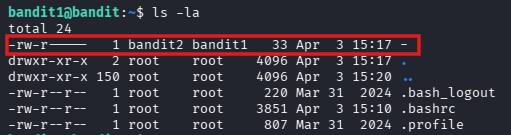
bandit1@bandit:~$ ls -la
total 24
-rw-r-----   1 bandit2 bandit1   33 Apr  3 15:17 -
drwxr-xr-x   2 root    root    4096 Apr  3 15:17 .
drwxr-xr-x 150 root    root    4096 Apr  3 15:20 ..
-rw-r--r--   1 root    root     220 Mar 31  2024 .bash_logout
-rw-r--r--   1 root    root    3851 Apr  3 15:10 .bashrc
-rw-r--r--   1 root    root     807 Mar 31  2024 .profile
We can identify a strange file -
After a quick research of dashed filenames on google, this is the result I got from the AI overview
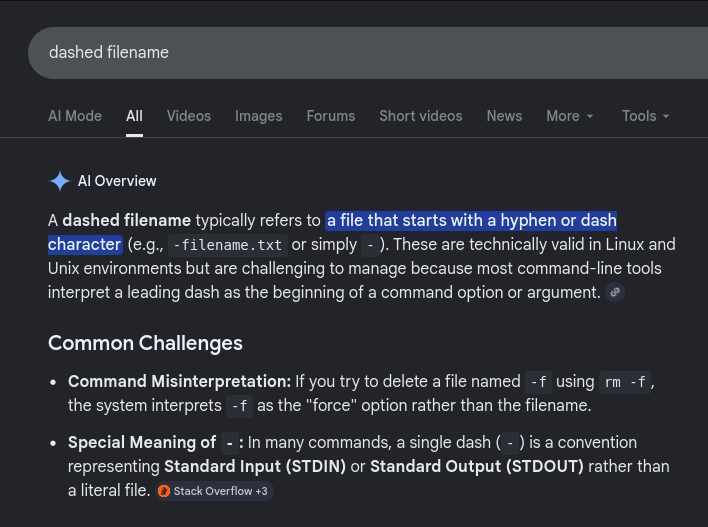
To interact with these files, we must prevent the shell from reading the dash as an options by:
- Using the Double Dash (
--): The -- symbol tells many Linux commands (like cat, rm, mv) to stop looking for options and treat everything following it as a filename. Example:rm -- -filename.txt - Using a Relative Path (
./): By adding ./ (the current directory) to the front, the command no longer sees the dash as the first character, ensuring it is treated as a path. Example:cat ./-filename.txt - Using an Absolute Path: Specifying the full path from the root directory also avoids the leading dash issue. Example:
ls /home/user/-filename.txt
I then proceed to read the file in three different ways (yeah, this challenge must understand that we are not rookies)
bandit1@bandit:~$ cat ./-
263JXXXXXXXXXXXXXXXXXXXXXXX29mFx

bandit1@bandit:~$ pwd
/home/bandit1
bandit1@bandit:~$ cat /home/bandit1/-
263JXXXXXXXXXXXXXXXXXXXXXXX29mFx

bandit1@bandit:~$ cat ~/-
263JXXXXXXXXXXXXXXXXXXXXXXX29mFx
bandit1@bandit:~$
I feel like the warm-ups are taking longer than expected😌, let's go to the next before we start sharing the snacks😙
Bandit Level 2 → Level 3
Level Goal
The password for the next level is stored in a file called --spaces in this filename-- located in the home directory
Solution
After establishing our SSH connection, we have to read the content of the file --spaces in this filename--. Why would someone name a file like this?!🧐... I guess this is none of our business, let's move forward
┌──(jovi㉿Jovi)-[~]
└─$ ssh bandit2@bandit.labs.overthewire.org -p 2220
                         _                     _ _ _
                        | |__   __ _ _ __   __| (_) |_
                        | '_ \ / _` | '_ \ / _` | | __|
                        | |_) | (_| | | | | (_| | | |_
                        |_.__/ \__,_|_| |_|\__,_|_|\__|


                      This is an OverTheWire game server.
            More information on http://www.overthewire.org/wargames

backend: gibson-1
bandit2@bandit.labs.overthewire.org's password:

      ,----..            ,----,          .---.
     /   /   \         ,/   .`|         /. ./|
    /   .     :      ,`   .'  :     .--'.  ' ;
   .   /   ;.  \   ;    ;     /    /__./ \ : |
  .   ;   /  ` ; .'___,/    ,' .--'.  '   \' .
  ;   |  ; \ ; | |    :     | /___/ \ |    ' '
  |   :  | ; | ' ;    |.';  ; ;   \  \;      :
  .   |  ' ' ' : `----'  |  |  \   ;  `      |
  '   ;  \; /  |     '   :  ;   .   \    .\  ;
   \   \  ',  /      |   |  '    \   \   ' \ |
    ;   :    /       '   :  |     :   '  |--"
     \   \ .'        ;   |.'       \   \ ;
  www. `---` ver     '---' he       '---" ire.org


Welcome to OverTheWire!

<SNIP>

bandit2@bandit:~$ ls -la
total 24
drwxr-xr-x   2 root    root    4096 Apr  3 15:17 .
drwxr-xr-x 150 root    root    4096 Apr  3 15:20 ..
-rw-r--r--   1 root    root     220 Mar 31  2024 .bash_logout
-rw-r--r--   1 root    root    3851 Apr  3 15:10 .bashrc
-rw-r--r--   1 root    root     807 Mar 31  2024 .profile
-rw-r-----   1 bandit3 bandit2   33 Apr  3 15:17 --spaces in this filename--
To read the content of this file, we will use the methods stated in the previous level. Since we are great linux users, we will do that in several ways🙃
bandit2@bandit:~$ cat -- '--spaces in this filename--'
MNk8XXXXXXXXXXXXXXXXXXXXXXXPlSmx

bandit2@bandit:~$ cat -- --spaces\ in\ this\ filename--
MNk8XXXXXXXXXXXXXXXXXXXXXXXPlSmx

bandit2@bandit:~$ cat ./'--spaces in this filename--'
MNk8XXXXXXXXXXXXXXXXXXXXXXXPlSmx

bandit2@bandit:~$ cat ./--spaces\ in\ this\ filename--
MNk8XXXXXXXXXXXXXXXXXXXXXXXPlSmx
Here we had 2 challenges:
- The double dash (
--) that the shell can interpret as the beginning of an option. - The spaces in the name.
For the double dash, we used -- to tell linux to stop looking for options; and for the spaces, we could either escape the character using \ or wrap the name of the file with quotes (') which eliminates any special character within
With that done, you can take a small coffee break, you deserve it😏.
Bandit Level 3 → Level 4
Level Goal
The password for the next level is stored in a hidden file in the inhere directory.
Solution
Back already?! Where's that person from the back?🧐
Ah, there he is! Let's continue...🙂↔️
┌──(jovi㉿Jovi)-[~]
└─$ ssh bandit3@bandit.labs.overthewire.org -p 2220
                         _                     _ _ _
                        | |__   __ _ _ __   __| (_) |_
                        | '_ \ / _` | '_ \ / _` | | __|
                        | |_) | (_| | | | | (_| | | |_
                        |_.__/ \__,_|_| |_|\__,_|_|\__|


                      This is an OverTheWire game server.
            More information on http://www.overthewire.org/wargames

backend: gibson-1
bandit3@bandit.labs.overthewire.org's password:

      ,----..            ,----,          .---.
     /   /   \         ,/   .`|         /. ./|
    /   .     :      ,`   .'  :     .--'.  ' ;
   .   /   ;.  \   ;    ;     /    /__./ \ : |
  .   ;   /  ` ; .'___,/    ,' .--'.  '   \' .
  ;   |  ; \ ; | |    :     | /___/ \ |    ' '
  |   :  | ; | ' ;    |.';  ; ;   \  \;      :
  .   |  ' ' ' : `----'  |  |  \   ;  `      |
  '   ;  \; /  |     '   :  ;   .   \    .\  ;
   \   \  ',  /      |   |  '    \   \   ' \ |
    ;   :    /       '   :  |     :   '  |--"
     \   \ .'        ;   |.'       \   \ ;
  www. `---` ver     '---' he       '---" ire.org


Welcome to OverTheWire!

<SNIP>

bandit3@bandit:~$ ls -la
total 24
drwxr-xr-x   3 root root 4096 Apr  3 15:17 .
drwxr-xr-x 150 root root 4096 Apr  3 15:20 ..
-rw-r--r--   1 root root  220 Mar 31  2024 .bash_logout
-rw-r--r--   1 root root 3851 Apr  3 15:10 .bashrc
drwxr-xr-x   2 root root 4096 Apr  3 15:17 inhere
-rw-r--r--   1 root root  807 Mar 31  2024 .profile
We can then move into the inhere directory and list the content
bandit3@bandit:~$ cd inhere
bandit3@bandit:~/inhere$ ls
bandit3@bandit:~/inhere$
Is this a joke? -- You ask
Why would there send us in an empty directory to find the password? But calm down and go back on the goal, the file is hidden.
Linux hidden files:
- Files starting with . are hidden
- Common examples: .bashrc, .profile, .ssh/
- ls shows them with the -a (all) flag
- ls -la shows all files with long format (permissions, size, etc.)
bandit3@bandit:~/inhere$ ls -la
total 12
drwxr-xr-x 2 root    root    4096 Apr  3 15:17 .
drwxr-xr-x 3 root    root    4096 Apr  3 15:17 ..
-rw-r----- 1 bandit4 bandit3   33 Apr  3 15:17 ...Hiding-From-You
And here it is, all that's left is to read the content of the file
bandit3@bandit:~/inhere$ cat ...Hiding-From-You
2WmrXXXXXXXXXXXXXXXXXXXXXXXXhF3NJ
bandit3@bandit:~/inhere$
Looks like you're enjoying this challenge!😎. Let's get to the last level of this walkthrough
Bandit Level 4 → Level 5
Level Goal
The password for the next level is stored in the only human-readable file in the inhere directory. Tip: if your terminal is messed up, try the “reset” command.
Solution
Let's connect and get this level done in 30 seconds
┌──(jovi㉿Jovi)-[~]
└─$ ssh bandit4@bandit.labs.overthewire.org -p 2220
                         _                     _ _ _
                        | |__   __ _ _ __   __| (_) |_
                        | '_ \ / _` | '_ \ / _` | | __|
                        | |_) | (_| | | | | (_| | | |_
                        |_.__/ \__,_|_| |_|\__,_|_|\__|


                      This is an OverTheWire game server.
            More information on http://www.overthewire.org/wargames

backend: gibson-1
bandit4@bandit.labs.overthewire.org's password:

      ,----..            ,----,          .---.
     /   /   \         ,/   .`|         /. ./|
    /   .     :      ,`   .'  :     .--'.  ' ;
   .   /   ;.  \   ;    ;     /    /__./ \ : |
  .   ;   /  ` ; .'___,/    ,' .--'.  '   \' .
  ;   |  ; \ ; | |    :     | /___/ \ |    ' '
  |   :  | ; | ' ;    |.';  ; ;   \  \;      :
  .   |  ' ' ' : `----'  |  |  \   ;  `      |
  '   ;  \; /  |     '   :  ;   .   \    .\  ;
   \   \  ',  /      |   |  '    \   \   ' \ |
    ;   :    /       '   :  |     :   '  |--"
     \   \ .'        ;   |.'       \   \ ;
  www. `---` ver     '---' he       '---" ire.org


Welcome to OverTheWire!

<SNIP>

bandit4@bandit:~$ ls -la
total 24
drwxr-xr-x   3 root root 4096 Apr  3 15:17 .
drwxr-xr-x 150 root root 4096 Apr  3 15:20 ..
-rw-r--r--   1 root root  220 Mar 31  2024 .bash_logout
-rw-r--r--   1 root root 3851 Apr  3 15:10 .bashrc
drwxr-xr-x   2 root root 4096 Apr  3 15:17 inhere
-rw-r--r--   1 root root  807 Mar 31  2024 .profile
Let's see what surprise we have in the inhere directory this time
bandit4@bandit:~$ cd inhere
bandit4@bandit:~/inhere$ ls -la
total 48
drwxr-xr-x 2 root    root    4096 Apr  3 15:17 .
drwxr-xr-x 3 root    root    4096 Apr  3 15:17 ..
-rw-r----- 1 bandit5 bandit4   33 Apr  3 15:17 -file00
-rw-r----- 1 bandit5 bandit4   33 Apr  3 15:17 -file01
-rw-r----- 1 bandit5 bandit4   33 Apr  3 15:17 -file02
-rw-r----- 1 bandit5 bandit4   33 Apr  3 15:17 -file03
-rw-r----- 1 bandit5 bandit4   33 Apr  3 15:17 -file04
-rw-r----- 1 bandit5 bandit4   33 Apr  3 15:17 -file05
-rw-r----- 1 bandit5 bandit4   33 Apr  3 15:17 -file06
-rw-r----- 1 bandit5 bandit4   33 Apr  3 15:17 -file07
-rw-r----- 1 bandit5 bandit4   33 Apr  3 15:17 -file08
-rw-r----- 1 bandit5 bandit4   33 Apr  3 15:17 -file09
We then proceed to see what type of file we are dealing with using the file command
bandit4@bandit:~/inhere$ file ./-file00
./-file00: data
bandit4@bandit:~/inhere$ file ./-file01
./-file01: data
Okay, let's level up and automate this with find command
bandit4@bandit:~/inhere$ find . -exec file {} \;
.: directory
./-file03: data
./-file02: data
./-file07: ASCII text
./-file00: data
./-file04: data
./-file09: data
./-file05: data
./-file08: data
./-file06: data
./-file01: data
We now know which file contains human readable text. But what if we had too many files to search on? I got you🙂↕️.
We could just grep to look for 'ASCII' text in the output
bandit4@bandit:~/inhere$ find . -exec file {} \; | grep ASCII
./-file07: ASCII text
We can now view the content of the file (And we made it in 30 sec😎)
bandit4@bandit:~/inhere$ cat ./-file07
4oQYXXXXXXXXXXXXXXXXXXXXXXXXGUQw
That's all for the first part of this tutorial, thanks for passing by. See you later for the next part😁