Overthewire - Bandit 5-9
Hello guys. Let's start the next part of our OverTheWire Bandit series. Last time we went through the Bandit 0-4. Let's dive in to the next part.
Bandit Level 5 → Level 6
Level Goal
The password for the next level is stored in a file somewhere under the inhere directory and has all of the following properties:
- human-readable
- 1033 bytes in size
- not executable
Solution
Remember, the warm-ups ended in the previous tutorial, now things are becoming interesting so fasten your seatbelt and concentrate🙂. Yes I'm talking to you😎.
First we will connect to the server with bandit5 password from the previous challenge.
┌──(jovi㉿Jovi)-[~]
└─$ ssh bandit5@bandit.labs.overthewire.org -p 2220
                         _                     _ _ _
                        | |__   __ _ _ __   __| (_) |_
                        | '_ \ / _` | '_ \ / _` | | __|
                        | |_) | (_| | | | | (_| | | |_
                        |_.__/ \__,_|_| |_|\__,_|_|\__|


                      This is an OverTheWire game server.
            More information on http://www.overthewire.org/wargames

backend: gibson-1
bandit5@bandit.labs.overthewire.org's password:

      ,----..            ,----,          .---.
     /   /   \         ,/   .`|         /. ./|
    /   .     :      ,`   .'  :     .--'.  ' ;
   .   /   ;.  \   ;    ;     /    /__./ \ : |
  .   ;   /  ` ; .'___,/    ,' .--'.  '   \' .
  ;   |  ; \ ; | |    :     | /___/ \ |    ' '
  |   :  | ; | ' ;    |.';  ; ;   \  \;      :
  .   |  ' ' ' : `----'  |  |  \   ;  `      |
  '   ;  \; /  |     '   :  ;   .   \    .\  ;
   \   \  ',  /      |   |  '    \   \   ' \ |
    ;   :    /       '   :  |     :   '  |--"
     \   \ .'        ;   |.'       \   \ ;
  www. `---` ver     '---' he       '---" ire.org


Welcome to OverTheWire!

<SNIP>

bandit5@bandit:~$
After getting our shell, let us get the content of the inhere directory.
bandit5@bandit:~$ ls
inhere
bandit5@bandit:~$ cd inhere
bandit5@bandit:~/inhere$ ls -la
total 88
drwxr-x--- 22 root bandit5 4096 Apr  3 15:17 .
drwxr-xr-x  3 root root    4096 Apr  3 15:17 ..
drwxr-x---  2 root bandit5 4096 Apr  3 15:17 maybehere00
drwxr-x---  2 root bandit5 4096 Apr  3 15:17 maybehere01
drwxr-x---  2 root bandit5 4096 Apr  3 15:17 maybehere02
drwxr-x---  2 root bandit5 4096 Apr  3 15:17 maybehere03
drwxr-x---  2 root bandit5 4096 Apr  3 15:17 maybehere04
drwxr-x---  2 root bandit5 4096 Apr  3 15:17 maybehere05
drwxr-x---  2 root bandit5 4096 Apr  3 15:17 maybehere06
drwxr-x---  2 root bandit5 4096 Apr  3 15:17 maybehere07
drwxr-x---  2 root bandit5 4096 Apr  3 15:17 maybehere08
drwxr-x---  2 root bandit5 4096 Apr  3 15:17 maybehere09
drwxr-x---  2 root bandit5 4096 Apr  3 15:17 maybehere10
drwxr-x---  2 root bandit5 4096 Apr  3 15:17 maybehere11
drwxr-x---  2 root bandit5 4096 Apr  3 15:17 maybehere12
drwxr-x---  2 root bandit5 4096 Apr  3 15:17 maybehere13
drwxr-x---  2 root bandit5 4096 Apr  3 15:17 maybehere14
drwxr-x---  2 root bandit5 4096 Apr  3 15:17 maybehere15
drwxr-x---  2 root bandit5 4096 Apr  3 15:17 maybehere16
drwxr-x---  2 root bandit5 4096 Apr  3 15:17 maybehere17
drwxr-x---  2 root bandit5 4096 Apr  3 15:17 maybehere18
drwxr-x---  2 root bandit5 4096 Apr  3 15:17 maybehere19
I know what you are thinking of right now😏, but no😑! Why should we inspect file by file with all these directories?! And I'm sure there are even many files in each directory, that would be a torture. So let's use a handy tool find🙂
bandit5@bandit:~/inhere$ find . -type f -size 1033c ! -executable -exec file {} \; | grep ASCII
./maybehere07/.file2: ASCII text, with very long lines (1000)
Let's break down the command:
find . -type f -size 1033c ! -executable -exec file {} \; | grep text
find- Tool to search for files in a directory hierarchy-type f- We are looking for a file-size 1033c- The file should have a size of 1033 bytes! -executable- The file should not be executable-exec file {} \;- For each file found maching the search criteria, execute the file command on them| grep ASCII- From the output of the file command, output on the screen only human readable files
A common mistake you can make (I also did it🤧) is to enter the size with the option -size 1033b instead of -size 1033c for bytes. Luckily for us, we have the man page at our disposal.
┌──(jovi㉿Jovi)-[~]
└─$ man find
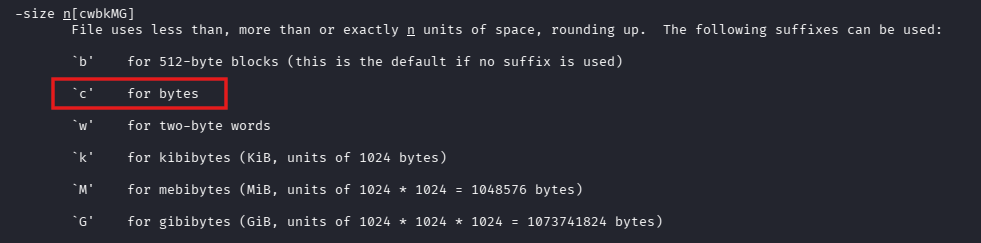
With this said, we can now view the content of the file
bandit5@bandit:~/inhere$ cat ./maybehere07/.file2
HWasXXXXXXXXXXXXXXXXXXXXXXXUa6EG
Take a sip of coffee and follow up for the next one🙂
Bandit Level 6 → Level 7
Level Goal
The password for the next level is stored somewhere on the server and has all of the following properties:
- owned by user bandit7
- owned by group bandit6
- 33 bytes in size
Solution
After exploring the manual page, we can find the exact options we need to solve this challenge. Firstly let's connect as bandit6 on SSH
┌──(jovi㉿Jovi)-[~]
└─$ ssh bandit6@bandit.labs.overthewire.org -p 2220
                         _                     _ _ _
                        | |__   __ _ _ __   __| (_) |_
                        | '_ \ / _` | '_ \ / _` | | __|
                        | |_) | (_| | | | | (_| | | |_
                        |_.__/ \__,_|_| |_|\__,_|_|\__|


                      This is an OverTheWire game server.
            More information on http://www.overthewire.org/wargames

backend: gibson-0
bandit6@bandit.labs.overthewire.org's password:

      ,----..            ,----,          .---.
     /   /   \         ,/   .`|         /. ./|
    /   .     :      ,`   .'  :     .--'.  ' ;
   .   /   ;.  \   ;    ;     /    /__./ \ : |
  .   ;   /  ` ; .'___,/    ,' .--'.  '   \' .
  ;   |  ; \ ; | |    :     | /___/ \ |    ' '
  |   :  | ; | ' ;    |.';  ; ;   \  \;      :
  .   |  ' ' ' : `----'  |  |  \   ;  `      |
  '   ;  \; /  |     '   :  ;   .   \    .\  ;
   \   \  ',  /      |   |  '    \   \   ' \ |
    ;   :    /       '   :  |     :   '  |--"
     \   \ .'        ;   |.'       \   \ ;
  www. `---` ver     '---' he       '---" ire.org


Welcome to OverTheWire!

<SNIP>

bandit6@bandit:~$
This time around, the file containing the password is somewhere on the server, no more in the inhere directory. Don't cry, I got your back😌
bandit6@bandit:~$ find / -type f -user bandit7 -group bandit6 -size 33c 2>/dev/null
/var/lib/dpkg/info/bandit7.password
The command is self explanatory, but what's new here is the 2>/dev/null.
Understanding error redirection:
2>/dev/null
2= Standard error (stderr) file descriptor>= Redirect/dev/null= The "black hole" of Linux (discards all data)
Why we need it here:
When searching the entire filesystem (/), you'll encounter many "Permission denied" errors for directories we can't access. Redirecting these errors keeps our output clean and readable.
All that's left now is to see the content of the file
bandit6@bandit:~$ cat /var/lib/dpkg/info/bandit7.password
morbXXXXXXXXXXXXXXXXXXXXXXXFVAaj
Next!!😎
Bandit Level 7 → Level 8
Level Goal
The password for the next level is stored in the file data.txt next to the word millionth
Solution
We are now moving to file manipulation, things are becoming interesting. Let's establish our connection first
┌──(jovi㉿Jovi)-[~]
└─$ ssh bandit7@bandit.labs.overthewire.org -p 2220
                         _                     _ _ _
                        | |__   __ _ _ __   __| (_) |_
                        | '_ \ / _` | '_ \ / _` | | __|
                        | |_) | (_| | | | | (_| | | |_
                        |_.__/ \__,_|_| |_|\__,_|_|\__|


                      This is an OverTheWire game server.
            More information on http://www.overthewire.org/wargames

backend: gibson-0
bandit7@bandit.labs.overthewire.org's password:

      ,----..            ,----,          .---.
     /   /   \         ,/   .`|         /. ./|
    /   .     :      ,`   .'  :     .--'.  ' ;
   .   /   ;.  \   ;    ;     /    /__./ \ : |
  .   ;   /  ` ; .'___,/    ,' .--'.  '   \' .
  ;   |  ; \ ; | |    :     | /___/ \ |    ' '
  |   :  | ; | ' ;    |.';  ; ;   \  \;      :
  .   |  ' ' ' : `----'  |  |  \   ;  `      |
  '   ;  \; /  |     '   :  ;   .   \    .\  ;
   \   \  ',  /      |   |  '    \   \   ' \ |
    ;   :    /       '   :  |     :   '  |--"
     \   \ .'        ;   |.'       \   \ ;
  www. `---` ver     '---' he       '---" ire.org


Welcome to OverTheWire!

<SNIP>

bandit7@bandit:~$
Let's see how many lines we have in this file, maybe we can just open the file and look for the line with the word millionth
bandit7@bandit:~$ ls -la
total 4108
drwxr-xr-x   2 root    root       4096 Apr  3 15:18 .
drwxr-xr-x 150 root    root       4096 Apr  3 15:20 ..
-rw-r--r--   1 root    root        220 Mar 31  2024 .bash_logout
-rw-r--r--   1 root    root       3851 Apr  3 15:10 .bashrc
-rw-r-----   1 bandit8 bandit7 4184396 Apr  3 15:18 data.txt
-rw-r--r--   1 root    root        807 Mar 31  2024 .profile
bandit7@bandit:~$ wc data.txt
  98567  197133 4184396 data.txt
Abandon that idea, it would be tedious, we have upto 98567 lines in the file. Let's use the grep tool instead
bandit7@bandit:~$ grep millionth data.txt
millionth       dfwvzXXXXXXXXXXXXXXXXXXXXXXX7eEc
Breaking down the command:
grep- Tool to print lines that match patternsmillionth- The pattern we are looking fordata.txt- The file in which we are looking for the pattern
Why grep is powerful:
Grep searches for patterns, not just exact words. This means you can:
- Search case-insensitively:
grep -i MILLIONTH data.txt - Search for multiple patterns:
grep -E "millionth|password" data.txt - Show line numbers:
grep -n millionth data.txt - Count matches:
grep -c millionth data.txt
We'll explore more grep features in future challenges!
Why are you smiling? It seems like someone is learning something😏.
Let me give you a small tip since you are interested.
The `whatis` command displays one-line manual page descriptions. Great for quick reference without reading full man pages!
Examples:┌──(jovi㉿Jovi)-[~]
└─$ whatis grep
grep (1) - print lines that match patterns
┌──(jovi㉿Jovi)-[~]
└─$ whatis find
find (1) - search for files in a directory hierarchy
┌──(jovi㉿Jovi)-[~]
└─$ whatis sort
sort (1) - sort lines of text files
┌──(jovi㉿Jovi)-[~]
└─$ whatis whatis
whatis (1) - display one-line manual page descriptions
- apropos keyword - Search for commands by keyword
- man -k keyword - Same as apropos
- tldr command - Community-driven simplified man pages
You deserved this tip, let's proceed to the next one🙃
Bandit Level 8 → Level 9
Level Goal
The password for the next level is stored in the file data.txt and is the only line of text that occurs only once
Solution
┌──(jovi㉿Jovi)-[~]
└─$ ssh bandit8@bandit.labs.overthewire.org -p 2220
                         _                     _ _ _
                        | |__   __ _ _ __   __| (_) |_
                        | '_ \ / _` | '_ \ / _` | | __|
                        | |_) | (_| | | | | (_| | | |_
                        |_.__/ \__,_|_| |_|\__,_|_|\__|


                      This is an OverTheWire game server.
            More information on http://www.overthewire.org/wargames

backend: gibson-0
bandit8@bandit.labs.overthewire.org's password:

      ,----..            ,----,          .---.
     /   /   \         ,/   .`|         /. ./|
    /   .     :      ,`   .'  :     .--'.  ' ;
   .   /   ;.  \   ;    ;     /    /__./ \ : |
  .   ;   /  ` ; .'___,/    ,' .--'.  '   \' .
  ;   |  ; \ ; | |    :     | /___/ \ |    ' '
  |   :  | ; | ' ;    |.';  ; ;   \  \;      :
  .   |  ' ' ' : `----'  |  |  \   ;  `      |
  '   ;  \; /  |     '   :  ;   .   \    .\  ;
   \   \  ',  /      |   |  '    \   \   ' \ |
    ;   :    /       '   :  |     :   '  |--"
     \   \ .'        ;   |.'       \   \ ;
  www. `---` ver     '---' he       '---" ire.org


Welcome to OverTheWire!

<SNIP>

bandit8@bandit:~$
Let's see the structure of the file
bandit8@bandit:~$ ls -la
total 56
drwxr-xr-x   2 root    root     4096 Apr  3 15:18 .
drwxr-xr-x 150 root    root     4096 Apr  3 15:20 ..
-rw-r--r--   1 root    root      220 Mar 31  2024 .bash_logout
-rw-r--r--   1 root    root     3851 Apr  3 15:10 .bashrc
-rw-r-----   1 bandit9 bandit8 33033 Apr  3 15:18 data.txt
-rw-r--r--   1 root    root      807 Mar 31  2024 .profile

# The head command to view the first 10 lines of the data.txt file
bandit8@bandit:~$ head data.txt
xKsDNVi9P1QxAfpXjRkWnVNwNAROsWL4
TNbE7gPGCQmBnJV8tssvVrEP2sSnI70k
hS72gFEpvw6VepgzyYAUFPntDT1hnQnl
jBe9vdX53Lutc3Ns7y4TDsa2qM9bMEBF
B1uT8QixsY4rCaya4vZC3A7RrEn01DgE
hKpJ0QhRtZJFaQmJ9EJkbgmkvAD04VY3
4tsxNEl92WRocQJon0QrBdwdJGrKH6Lv
a3kmaYKoKRCZu9mMdXWdhjYCN4J7qn97
JkDOcRaSLTBIzSIURRsdAEKriMgnhEu5
qAjmvQOVbkCV7XyJyZRnmwx3zIEDTTtH
After sorting, we can see the file really contains duplicate lines. We can trust the author!🤧
bandit8@bandit:~$ cat data.txt | sort | head
0yZKMBVuhEEoPdNZFRgEWAURXuDjK0T4
0yZKMBVuhEEoPdNZFRgEWAURXuDjK0T4
0yZKMBVuhEEoPdNZFRgEWAURXuDjK0T4
0yZKMBVuhEEoPdNZFRgEWAURXuDjK0T4
0yZKMBVuhEEoPdNZFRgEWAURXuDjK0T4
0yZKMBVuhEEoPdNZFRgEWAURXuDjK0T4
0yZKMBVuhEEoPdNZFRgEWAURXuDjK0T4
0yZKMBVuhEEoPdNZFRgEWAURXuDjK0T4
0yZKMBVuhEEoPdNZFRgEWAURXuDjK0T4
0yZKMBVuhEEoPdNZFRgEWAURXuDjK0T4
We can now proceed and use the uniq -u command to display only the line that is not duplicated
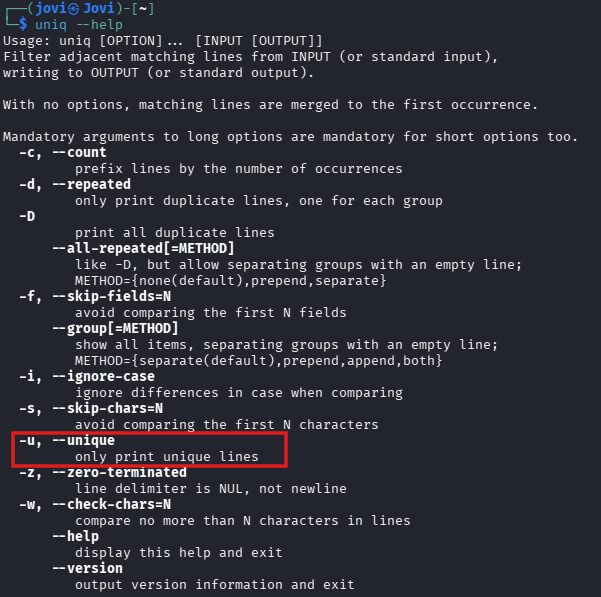
bandit8@bandit:~$ cat data.txt | sort | uniq -u
4CKMXXXXXXXXXXXXXXXXXXXXXXXAg0JM
Command breakdown:
cat data.txt | sort | uniq -u
cat data.txt- Output file contents| sort- Sort lines alphabetically (groups duplicates together)| uniq -u- Show only unique lines (lines that appear once)-uflag = unique (not duplicated)- Without
-u, it would show one copy of each line
Why we need to sort before using uniq:
The uniq command only removes adjacent duplicate lines. If duplicates are scattered throughout the file, uniq won't catch them.
Let's move to the last challenge of this walkthrough.
Bandit Level 9 → Level 10
Level Goal
The password for the next level is stored in the file data.txt in one of the few human-readable strings, preceded by several ‘=’ characters.
Solution
Let's connect to the SSH server
┌──(jovi㉿Jovi)-[~]
└─$ ssh bandit9@bandit.labs.overthewire.org -p 2220
                         _                     _ _ _
                        | |__   __ _ _ __   __| (_) |_
                        | '_ \ / _` | '_ \ / _` | | __|
                        | |_) | (_| | | | | (_| | | |_
                        |_.__/ \__,_|_| |_|\__,_|_|\__|


                      This is an OverTheWire game server.
            More information on http://www.overthewire.org/wargames

backend: gibson-0
bandit9@bandit.labs.overthewire.org's password:

      ,----..            ,----,          .---.
     /   /   \         ,/   .`|         /. ./|
    /   .     :      ,`   .'  :     .--'.  ' ;
   .   /   ;.  \   ;    ;     /    /__./ \ : |
  .   ;   /  ` ; .'___,/    ,' .--'.  '   \' .
  ;   |  ; \ ; | |    :     | /___/ \ |    ' '
  |   :  | ; | ' ;    |.';  ; ;   \  \;      :
  .   |  ' ' ' : `----'  |  |  \   ;  `      |
  '   ;  \; /  |     '   :  ;   .   \    .\  ;
   \   \  ',  /      |   |  '    \   \   ' \ |
    ;   :    /       '   :  |     :   '  |--"
     \   \ .'        ;   |.'       \   \ ;
  www. `---` ver     '---' he       '---" ire.org


Welcome to OverTheWire!

<SNIP>

bandit9@bandit:~$
We can now print the lines beginning with "==" using grep and regular expressions
bandit9@bandit:~$ ls -la
total 40
drwxr-xr-x   2 root     root     4096 Apr  3 15:17 .
drwxr-xr-x 150 root     root     4096 Apr  3 15:20 ..
-rw-r--r--   1 root     root      220 Mar 31  2024 .bash_logout
-rw-r--r--   1 root     root     3851 Apr  3 15:10 .bashrc
-rw-r-----   1 bandit10 bandit9 19382 Apr  3 15:17 data.txt
-rw-r--r--   1 root     root      807 Mar 31  2024 .profile

bandit9@bandit:~$ strings data.txt | grep -E "==+"
 ========== the
========== password
========== is
========== FGUW5XXXXXXXXXXXXXXXXXXXXXXXiqey
The strings command:
- Extracts printable character sequences from binary files
- By default, shows sequences of 4+ printable characters
- Filters out binary/non-readable data
Why we need it:
The file data.txt contains both binary data and text. Using cat or grep directly would show garbled output. strings extracts only the readable parts.
Regular expression breakdown:
grep -E "==+"
-E- Enable extended regular expressions=- Match the literal equals character=+- Match one or more additional equals signs- Together:
==+matches "==", "===", "====", etc.
Alternative patterns that would work:
grep "=="- Matches at least two equals signsgrep -E "={2,}"- Matches two or more equals signs
If you are not familiar to regular expressions, these are 2 great resources that can help, regexlearn and regexone
Hope you enjoyed today's walkthrough, and see you next time for the next part. Don't forget the manual page is your friend😁!